
Changelog

New updates and improvements to Toolblocks.

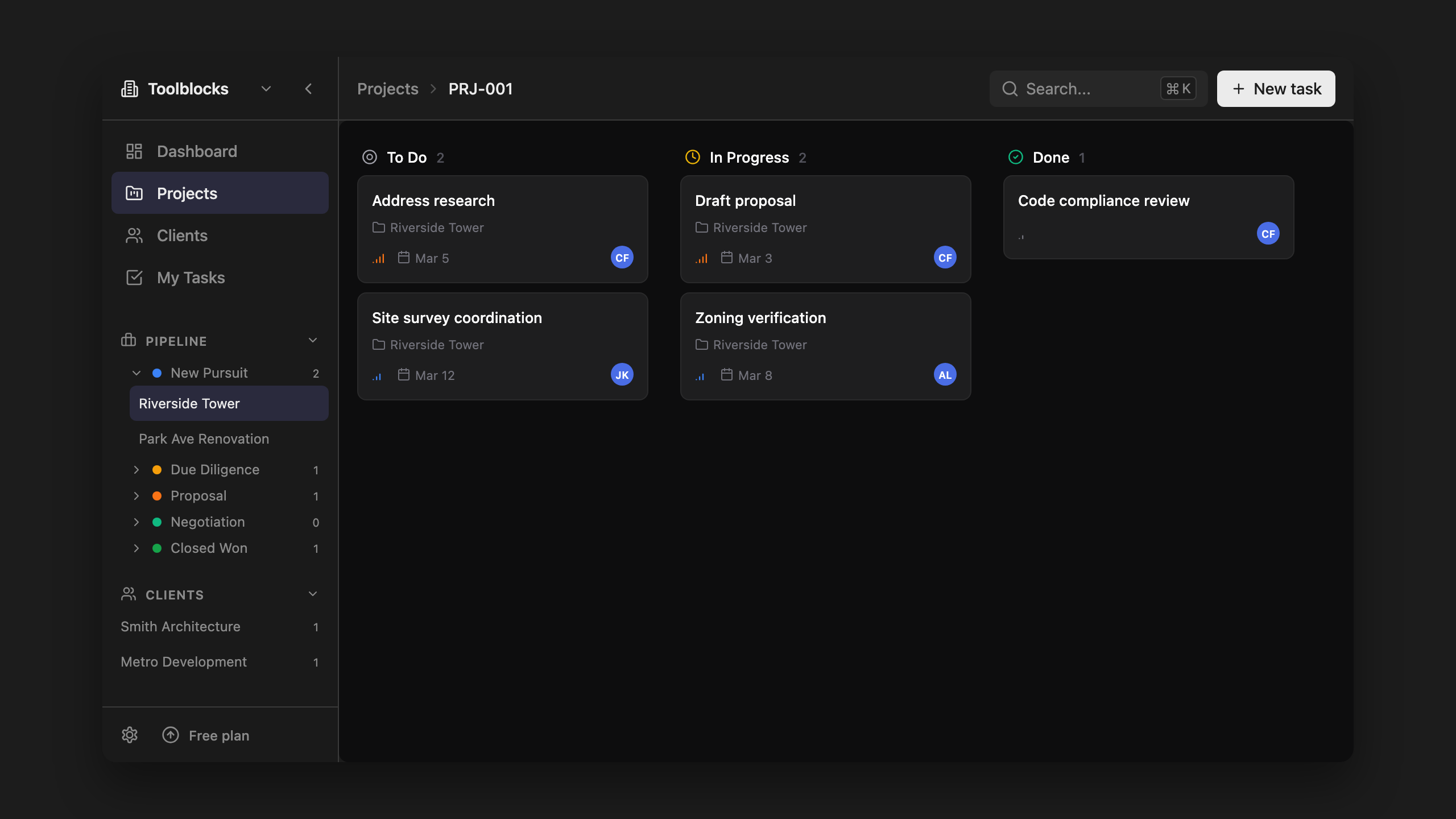
Your project workspace is here
Your project workspace is here

Track tasks, run AI research, and manage projects — all in one place. Toolblocks now includes a full project workspace with kanban boards, task lists, and Gantt views so you can keep project context together instead of switching between tools.

Create a project, add tasks, and run AI-powered research directly from the task view. Every output includes sources you can verify and override.

v0.6.1
  • Build: Fixed TypeScript declarations for pptxgenjs module
  • Build: Fixed implicit `any` types in error page component
  • Build: Fixed build script directory restore before renaming
  • Build: Increased Node.js memory limit for builds to prevent out-of-memory errors
v0.6.0
  • Research: Added presentation generator for creating concept packages
  • Build: Added Sentry integration for error tracking
  • Auth: Clearer OAuth callback handling and error categorization
  • Auth: Added refresh token error handling so sessions recover gracefully when tokens expire
  • Brand: Titleblocks is now Toolblocks across the entire application
  • Build: Updated robots and sitemap base URL handling
v0.5.0
  • Research: AI assistance now uses project context for more relevant results
  • Projects: Connect external tools and services directly in Toolblocks
  • Notifications: More reliable email delivery for important notifications
  • Calculators: Added Gutter Calculator for sizing gutters and downspouts
  • Projects: Mobile-friendly workspace — use Toolblocks on your phone or tablet
  • Calculators: Related calculators suggested while you work
  • Projects: Project grouping and views for easier organization
  • Projects: Quick bookmarking to save important content for later
  • Tasks: Tasks grouped by project for better organization
  • Research: AI responses scoped to your current project context
  • Calculators: Faster loading and smoother interactions
  • Calculators: Better preview images when sharing
  • Projects: Cleaner floor plan templates and handling
  • Calculators: Improved category organization
  • Onboarding: Smoother onboarding experience for new users
  • Build: Better navigation on industry and use case pages
v0.4.2
  • Command Menu: Faster search with precomputed keyword-to-app mappings and O(1) lookups
  • Command Menu: Animated placeholders for visual feedback during search
  • Command Menu: Direct hit detection for more relevant search results
  • Build: Reduced re-renders through memoization
v0.4.1
  • Command Menu: Simplified file handling — files are now processed directly by the AI router
  • Research: Cleaner AI response UI without thinking process display
v0.4.0
  • Research: Added web search integration for AI responses
  • Calculators: Added initial parameters and file handling support
  • Build: Added changelog link to footer
v0.3.0
  • Calculators: Added Closet Sizes, Lumber Sizes, Trim Selection, and Grout Selector
  • Projects: Added project management for organizing project-related content
  • Command Menu: Added Snip Tool and Clipboard History views
  • Tasks: Added note-taking with highlights and footnotes
  • Tasks: Added table and task list support to note editor
  • Calculators: Added reference and notes sections
  • Command Menu: Added AI badge indicator
  • Electron: Added native OS notifications for auto-updates
  • Command Menu: Better app badge and sorting
  • Build: Refactored Snip Tool with folder management and drag-and-drop
  • Build: Updated max-width settings for responsive design
v0.2.0
  • Calculators: Added Sheet Index Generator, Building Coverage, Cut & Fill, Wood Framing, Swale, Window-to-Wall Ratio, Retaining Wall, Footing Design, Duct Sizing, Cost Estimator, and more
  • Command Menu: Added Snip Tool with line type support
  • Command Menu: Added Clipboard History for tracking copied content
  • Projects: Added Diagram Editor integration
  • Calculators: Added Color Match tool for extracting and matching colors
  • Calculators: Added UpCodes Search for quick building code lookups
  • Calculators: Added Dimensions.com Search for furniture and object dimensions
  • Calculators: Added PAT Generator for creating hatch patterns
  • Calculators: Added Project Phase Checklist, Lineweight Guide, TV Mounting Calculator, Energy Use Intensity (EUI), and Folder Structure generator
  • Calculators: Added unit conversion with case-sensitive handling
  • Command Menu: Added recent and frequent apps display
  • Command Menu: Added app categorization and grouping
  • Build: Better industry and use case pages with related links
  • Build: Updated pricing page features
v0.1.2
  • Electron: Added email collection modal before installer downloads
  • Electron: Download tracking with Supabase integration
  • Electron: Rate limiting for download requests (5 per IP per 15 minutes)
  • Electron: Option to skip email collection and download directly
v0.1.0
  • Calculators: Initial release with calculator tools for Architecture, Engineering, and Construction
  • Command Menu: Keyboard shortcut (Cmd/Ctrl+K) for quick access
  • Electron: Auto-update support for seamless updates
  • Electron: Cross-platform support (Windows, macOS, Linux)
  • MAJOR (1.0.0): Breaking changes, major redesigns
  • MINOR (0.1.0): New features, significant improvements
  • PATCH (0.1.1): Bug fixes, small tweaks
  • New calculator added → MINOR bump
  • Fixed calculation error → PATCH bump
  • Complete UI redesign → MAJOR bump